
TL;DR

Get gifts for the two of you delivered free with Prime
- Fast, free delivery on millions of items
- Prime Video, Amazon Music and more included
- Member-only deals all year
Building your own AI workstation used to be cheaper, but rising component costs and shortages now make prebuilt systems equally competitive or even cheaper. The choice depends on your time, expertise, and how much control you want over tuning and upgrades.
Imagine turning on your new AI rig, ready to run models in minutes, with all the bugs ironed out. Sounds like a dream, right? But the big question isn’t just about getting the fastest parts—it’s whether you should build that machine yourself or buy a preconfigured system that’s ready to go.
This isn’t the same old debate. In 2026, the landscape has shifted dramatically. Component prices have surged, and supply chain issues have made building more expensive and unpredictable. Meanwhile, prebuilt systems are now often just as affordable, with expert tuning baked in. So, which path makes sense for you? That’s what we’ll explore.
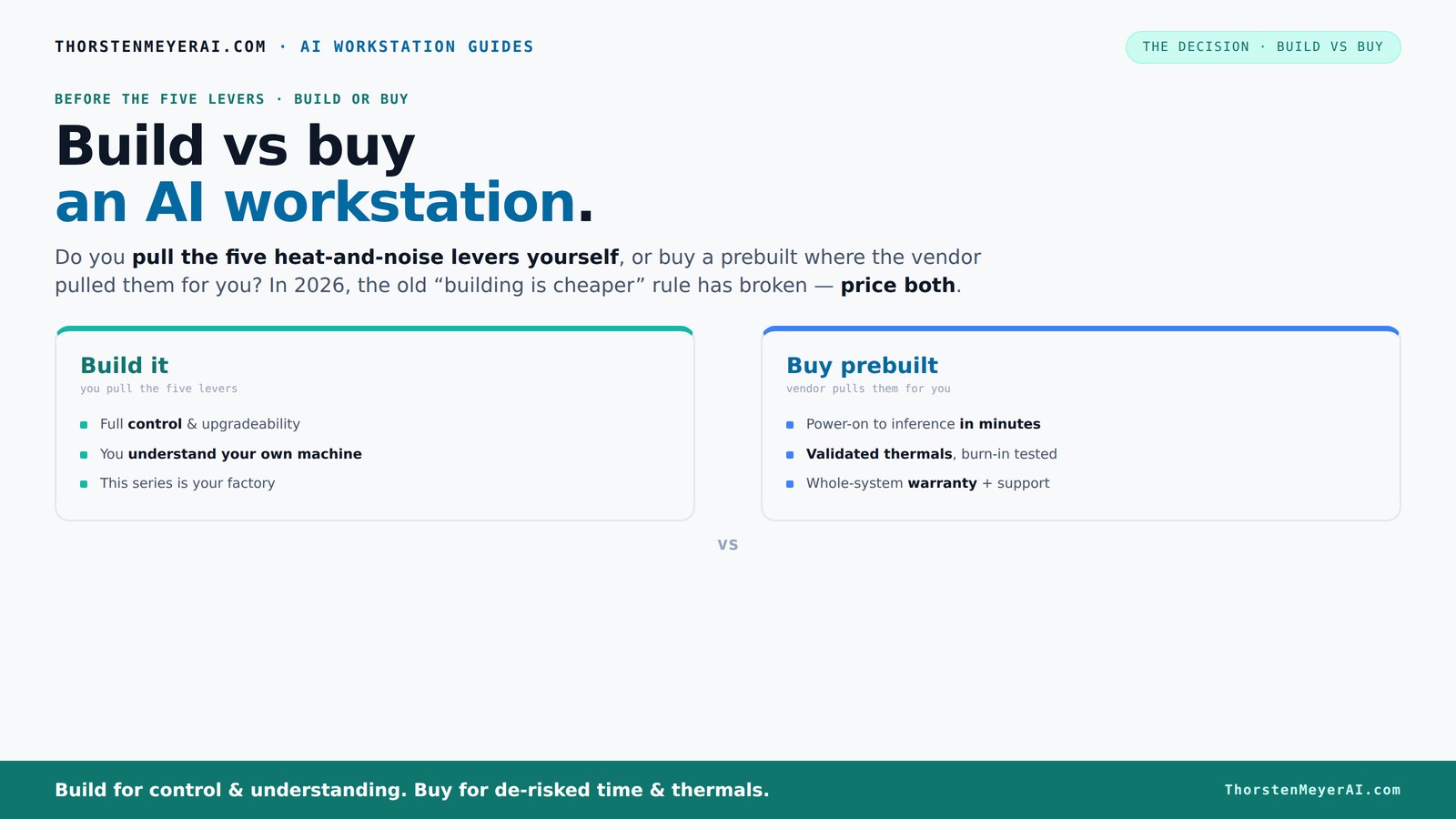
Build vs buy
an AI workstation.
The real question behind this whole series: do you pull the five heat-and-noise levers yourself, or buy a prebuilt where the vendor pulled them for you? And in 2026, the old “building is cheaper” rule has broken. Match your situation in Part 3.
Key Takeaways
- Component shortages and bulk-buy discounts in 2026 mean prebuilt AI workstations often match or beat DIY prices.
- Managing heat and noise is critical; vendors validate thermals, while DIYers tune every detail themselves.
- Support and warranty are major advantages of prebuilt systems, reducing downtime and troubleshooting stress.
- Upgrading a DIY system offers maximum control, but prebuilt systems often include future-proofing features and support.
- Your choice depends on your budget, technical skill, and how much control or support you want—there’s no one-size-fits-all.
As an affiliate, we earn on qualifying purchases.
Why the old rule of thumb no longer holds: building is usually cheaper — but not always
For years, the idea was simple: build your own machine to save money. But in 2026, that’s no longer true. The AI boom has caused component prices—like GPUs and DDR5 RAM—to skyrocket. A DIY build that once cost $1,000 now often hits $1,250 or more, just for parts.
Meanwhile, large vendors who buy in bulk—like Dell, Lambda, or Puget—snagged discounts on these components before prices climbed. They pass those savings on, making prebuilt systems surprisingly competitive. Sometimes, they’re even cheaper than sourcing parts yourself.
So, before you assume DIY is the cheapest, compare prices today—because the old rule doesn’t always apply anymore.
Beyond raw costs, this shift affects your decision-making process. Higher component prices mean that the potential savings from building your own system diminish, especially if you factor in the time and expertise required. Conversely, bulk buying and pre-assembly can lead to a more predictable, streamlined experience. This tradeoff emphasizes the importance of considering not just the sticker price but also the value of your time and technical skill in the overall cost equation.
As an affiliate, we earn on qualifying purchases.
The five levers: who pulls the heat and noise controls?
Building or buying a high-performance AI workstation isn’t just about parts—it’s about managing heat, noise, and stability during long workloads. There are five key levers: undervolting the GPU, matching the cooling system, optimizing case airflow, tuning fan curves, and proper placement.
If you buy prebuilt, the vendor pulls these levers for you. They test, tune, and validate thermals and noise levels before shipping. Companies like BIZON and Lambda even offer water-cooling options that run whisper-quiet under stress, backed by warranties.
Building your own means you get to control all five. You choose a quiet GPU, like the RTX 4080 or 4090, then undervolt and tune it for low noise. You pick a case designed for airflow, install custom fans, and fine-tune everything yourself. It’s a satisfying challenge—if you’re into thermal engineering.
In short: buy, and someone else manages the heat. Build, and you control the temperature—but it takes effort.
Why does this matter? Effective thermal management isn't just about comfort or noise; it directly impacts your hardware’s longevity and performance. Overheating can cause thermal throttling, reducing your system’s efficiency and lifespan. Conversely, a well-tuned system runs cooler, quieter, and more reliably, enabling sustained workloads without risking damage. The tradeoff is that DIY tuning requires knowledge, patience, and ongoing maintenance, whereas prebuilt systems offer peace of mind through factory-validated configurations. Understanding these differences helps you weigh the convenience against the control—especially if your workload demands maximum uptime and stability.
As an affiliate, we earn on qualifying purchases.
Compare the costs: build vs buy for a typical AI setup
| Factor | Build Your Own | Prebuilt System |
|---|---|---|
| Initial cost | Usually $1,250+ for a mid-range setup, often more if you include custom cooling or extras | Usually $1,300–$2,000, depending on specs and vendor |
| Time investment | Several hours to days assembling, tuning, troubleshooting | Minutes to hours—plug in, set up software, go |
| Support & warranty | DIY support; separate warranties for each component | Single support, often 3–5 years, with on-site or remote help |
| Upgrade flexibility | Easy—swap out parts as needed | Limited—may require new system for major upgrades |
| Thermal performance & noise | Depends on your tuning skills | Factory-validated, often quieter and cooler |
While these prices give a general idea, it’s crucial to understand the tradeoffs. Building might seem cheaper upfront, but the hidden costs—your time, troubleshooting, and potential delays—can add up. Conversely, prebuilt systems, especially at the high end, often include extensive validation, warranty support, and optimized thermals, which can translate into better reliability and fewer surprises. The key is to evaluate what matters most: cost, convenience, or confidence in performance under demanding workloads.
As an affiliate, we earn on qualifying purchases.
Upgrades, repairs, and future-proofing: what’s easier?
If you love tinkering, building your own system offers the best upgrade path. You can swap out GPUs, add RAM, or switch storage without much fuss. Plus, you get to pick the exact parts and tune every detail.
Prebuilt systems are more limited. Upgrading may involve replacing entire modules or calling support. Some vendors design their systems to be future-proof—like Lambda’s multi-GPU rigs with modular power supplies—but it’s not always straightforward.
Think about your plans. Will you need to keep this system for five years? Or just for a year or two? Building gives maximum flexibility. Buying offers peace of mind with warranties and support, especially if you’re not comfortable troubleshooting hardware.
Understanding these differences is critical because it impacts your long-term costs and usability. A DIY system can adapt as your needs evolve, but it requires ongoing effort and expertise. Prebuilt systems may be less flexible but often include features designed for easy upgrades or modularity, saving you time and reducing risk over the years. Consider your future workload, skill level, and whether you prefer hands-on control or a set-it-and-forget-it approach.
Support, warranty, and downtime risks
When your AI work is on the line, support matters. Prebuilt vendors typically offer comprehensive warranties—up to 5 years in some cases—and expert support when things go wrong.
If you build your own, you’re the support team. Troubleshooting hardware failures, BIOS issues, or thermal problems falls on you. DIY repairs can take time and might lead to longer downtime.
For critical workloads or tight deadlines, a prebuilt’s support can save days. For hobbyists or experienced users, DIY might be fine, but expect to handle the troubleshooting yourself.
Support isn’t just about fixing problems—it’s about minimizing downtime and ensuring your work continues smoothly. A prebuilt system with robust warranty and support services can drastically reduce the impact of hardware failures, which is crucial if your deadlines depend on it. Conversely, DIY support depends heavily on your knowledge and available resources, meaning longer recovery times and potential productivity loss. Weighing these factors helps you decide how much risk you’re willing to accept and whether the peace of mind from professional support justifies the extra cost.
Common mistakes buyers make and how to avoid them
One common mistake? Overestimating how much they’ll save building versus buying. When component prices spike, DIY can turn out to be more expensive and time-consuming than expected.
Another mistake is neglecting thermal management. A powerful GPU without proper cooling can throttle or overheat, ruining performance and lifespan. Always consider the heat and noise implications.
Lastly, forgetting future upgrades. If you plan to scale your AI work, choose a system—built or custom—that can grow with you. Don’t lock yourself into a tight configuration.
To avoid these pitfalls, do thorough research on component prices and thermal solutions beforehand. Consider your long-term needs—will your workload grow? Will you need to upgrade frequently? Be realistic about your skills and resources, and plan accordingly. This proactive approach helps prevent costly mistakes and ensures your investment remains effective over time.
Which option fits your use case? A quick buyer’s checklist
Use this to decide if you should go prebuilt, build your own, or a mix:
- Hobbyist or student: DIY, enjoy tuning for fun and learning.
- Small team or startup: Prebuilt, for quick deployment and support.
- Researcher needing customization: Build, for control and flexibility.
- Enterprise or mission-critical: Prebuilt with support, or hybrid approach.
- Budget-conscious but time-limited: Check prices—sometimes prebuilt is cheaper overall.
Remember, your choice should align with your specific workload, support needs, and long-term plans. A DIY build might be ideal for experimentation and learning, but it requires time and expertise. Prebuilt systems offer convenience and reliability, especially for critical operations. Consider your priorities carefully before making a decision—there’s no one-size-fits-all solution.
Frequently Asked Questions
Is a prebuilt AI workstation worth the extra cost?
For most users, especially those who need reliable performance and support, a prebuilt offers faster deployment, validated thermals, and warranty coverage. It often saves time and reduces troubleshooting stress, making it worth the extra expense for many.
Is building my own AI workstation cheaper?
Not always. Recent supply chain issues and component shortages have pushed DIY costs up. When you factor in your time and potential troubleshooting, prebuilt systems can be just as affordable or even cheaper for a comparable setup.
How much VRAM do I need for local AI models?
It depends on your workload. For training large models or running multiple inference tasks, 24–48 GB of VRAM is recommended. For smaller models, 12–16 GB can suffice. Always match VRAM to your specific model size and workload.
Are prebuilts more reliable than custom builds?
Prebuilts come with factory testing, validated thermals, and support, making them generally more reliable out of the box. Custom builds depend on your skill and care during assembly, but offer more control if you’re comfortable troubleshooting.
Can a prebuilt AI workstation handle future models and software updates?
Many prebuilt systems are designed with future upgrades in mind, especially at the enterprise level. However, check the specs—like PCIe slots and power supplies—to ensure you can scale in the future without replacing the whole system.
Conclusion
In the end, the decision isn’t just about saving a few bucks. It’s about how much effort you want to invest, your need for support, and your plans for the future. In 2026, both paths can lead you to a powerful AI workstation—just choose the one that fits your workflow best.
Remember, with the right system, you’ll be running models faster and cooler—whether you built it or bought it. So, ask yourself: what’s more important—control or convenience?
Fall Picks
fall essentials
As an affiliate, we earn on qualifying purchases.